
This blog is a static site, meaning that there are no cookies or server-side processing performed to display the content.
I chose to use Pelican for site generation since it is developed with python which I'm most comfortable with. Up until now, I've written the content, process the pages into HTML files and after reviewing the new content uploaded it manually to the web server. This has been fine for a long time however I've made the odd mistake during generation which caused a broken web page for a short period while I fix it.
I recently decided that I should treat the process a little more seriously as it is good practice to follow industry standards when doing personal projects as long as the effort doesn't outweigh the benefit.
The issue
Writing content for the blog is pretty easy however the publishing process isn't as straightforward as I would prefer.
Order of operation:
- Write a markdown document in the website project folder.
- Preview the new page using pelican built-in web server to check the page looks ok.
- Make edits if needed.
- When I'm happy with the page, I run the command to generate the page for publishing.
- manually upload the html files to the web server.
- double-check that the site is loading fine.
- commit the changes to my private git repo.
These steps are very easy, to be honest, steps 4-7 probably take five minutes to do.
Repetitive tasks no matter how easy, over time get skipped or forgotten by people.

It kind of reminds me of this footpath design. I'm sure you've seen this in your city/neighbourhood before.
The solution
Automation!!
Why not use automation to minimize the number of manual steps required to create content?
I've taken advantage of the DevOps tools that are built into AWS and are free (if you adhere to the free tier rules.).
I started out by fixing my git hygiene.
A branch for production and a branch for development are all that's needed at the moment since I'm the only one writing content.
Instead of the commits happening at the end of the process, it now needs to happen earlier on in the content writing process. lots of smaller changes are better than one big one at the end.
While writing the content and reviewing the page locally, there may not need to be a whole lot of commits but it does depend on how much is being changed.
Using AWS CodeBuild to generate the pages
Codebuild is a service offered by AWS that takes a list of instructions in the form of a 'buildspec' file, collects all the relevant artifacts and can then build your software automatically.
I started creating a Codebuild project to get pelican to generate the pages, however, while testing the process I got pretty impatient while waiting for codebuild to initialize a worker.
Luckily AWS provides CodeBuild images that can be run locally on docker.
I downloaded the dockerfile for the image I wanted to use and started the process to build the docker image. This took a long time since Australia still has terrible internet... 😠
After the docker image was built, I was able to test the build process on my machine very quickly to ensure that the correct version of pelican was used and a few other checks were performed on the data before the content was generated. Here's a simplified version of the 'buildspec.yml' file I was using while testing the process.
version: 0.2

phases:
  install:
    runtime-versions:
      python: 3.10
    commands:
      - pip3 install "pelican[markdown]" ## downloads pelican onto the codebuild worker.
  build:
    commands:
      - echo Build started on `date`
      - pelican html ## Generates html files

  post_build:
    commands:
      - echo Build completed on `date`
Buildspec files are used to instruct the codebuild worker what files and tools are required to put together the code written and build the software.
I then added a few more steps to the buildspec file to check for errors, detect syntax issues then upload the files to the web server.
Setting up CodePipeline
CodePipeline is another service provided by AWS that joins together all the stages of a build process: repository > build > deploy.
CodePipeline allows for each stage to be automated to the point where after a developer writes the code, the rest of the stages don't require human involvement. Makes things significantly faster with less room for mistakes.
I implemented the pipeline to watch for changes in the source repository, generate the files and deploy it to a staging web server.
Once the staging site is online, I've implemented a few tests to check if the page is rendering correctly. if staging looks good, a pull request is generated for me to manually review. once approved the changes are deployed to production.
The code pipeline looks like this (some parts redacted or hidden):
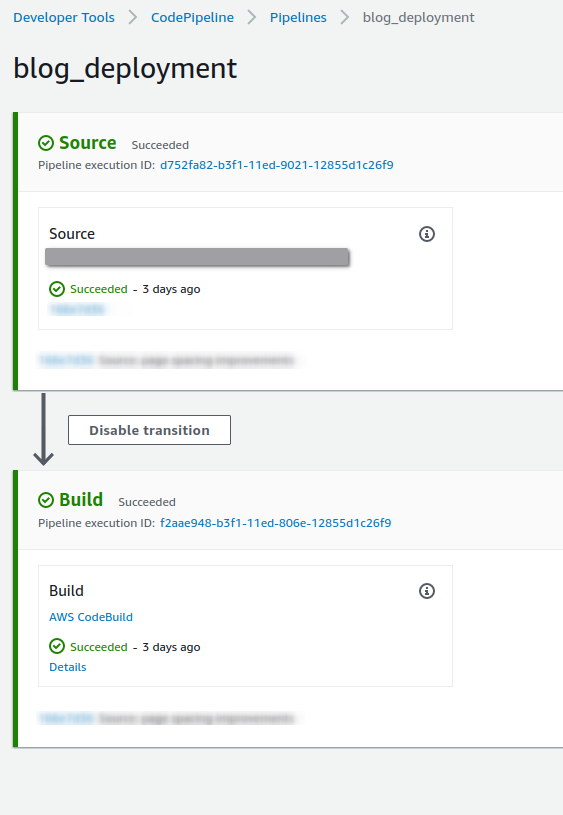
Since this blog is a static site, a deployment stage is not necessary. when a build is successful, the files are sent to the web server.
The new order of operation:
- Write content.
- Review the page locally.
- Make edits if needed.
- commit changes to the development branch.
- codepipeline triggers a build of the development version of the site and publishes it to the staging version of the blog. (Automated)
- Review to ensure the blog is working as expected. (Automated check)
- create a pull request to merge development to the production branch. (Automated)
- Codepipeline triggers a build to production and publishes the site to https://blog.s3nt.net. (Automated)
As seen above, steps 5-8 are fully automated now (with the exception of approving the pull request)
Roll back procedure
Rollbacks are just as easy. Changes are tested in staging before going to production.
if there was a problem with the site and I miss it during the review, I can roll back to the last good production release.
Rollback is using CodePipeline and therefore fully automated.